
Hello friends!
Just a few days ago, you all must have finished filling out your exam forms. Now that the form-filling process is over and you’ve hopefully got everything approved by your college on time, the next big step is getting your admit card. As we all know, your hall ticket is the most important document—without it, you cannot sit for the exams. It is also the only way to find out exactly which college has been assigned as your exam center.
MKBU April Exam Hall Ticket Download: Overview & Updates
So, when is the university releasing them? While there isn’t an exact official date announced just yet, MKBU typically releases the admit cards just a few days before the exams begin. If you remember, when the exam forms were active,j the university released a list of expected start dates for the upcoming exams. These dates vary depending on your stream, but generally, for the first few streams, the exams are expected to kick off around April 2nd. Because of this, I strongly believe that the link for the MKBU April exam hall ticket download will be active in just a few days—or maybe even anytime now!
Make sure to stay connected with us so you don’t miss any updates. Also, there is absolutely no need to panic or stress about checking the website constantly. Once the MKBU hall ticket 2026 is officially available on the platform, you will automatically receive a text message on your registered mobile number telling you to download it.
Once you get that message, you will need to get your printout ready. So, let’s quickly look at exactly how you can do that. To download your admit card, simply click on the direct link provided below and follow these steps!
How to Download Your MKBU April Exam Hall Ticket (Step-by-Step)
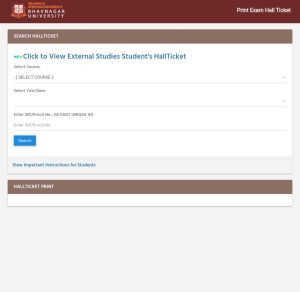
Downloading your admit card is actually pretty straightforward. Just follow these simple steps:
Go To Hallticket Download Page 📄
Step 1: Click the Direct Link First of all,
click on the official download link provided below. As soon as you click it, a new page will open up on your screen. (You can check the screenshot above to see exactly what this page looks like).
Step 2: Choose Your Course
On that page, the very first thing you need to do is select your stream from the dropdown menu. Just pick the degree you are currently pursuing—whether that’s B.Com, BA, BBA, BCA, MCA, M.Com, or any diploma course.
Step 3: Select Your Semester
Right below the course option, you will see a field for the Year/Semester. Just select the specific semester you are about to give the exam for.
Step 4: Enter Your Enrollment Number
Now for the final and most important step: type in your 16-digit Enrollment Number (SID).
What to Do After Downloading Your MKBU Hall Ticket 2026?
Step 5: Print, Sign, and Stamp
Once you hit that search button, your official hall ticket will finally appear on your screen. Go ahead and download the file, and take a clear, high-quality printout. But wait, your job isn’t completely done just yet! To become 100% eligible to sit in the examination hall, you need to take this printed admit card to your respective college. Make sure to get it signed by your principal and get the official college stamp put right on it. Without this official stamp and signature, your hall ticket is considered incomplete.
Next Steps: Supercharge Your Exam Preparation
Now that your hall ticket is sorted, the next and most crucial step is your exam preparation. If you are feeling stressed or overwhelmed by the syllabus, please don’t worry at all—you are not alone, and we are here to help you!
Stay connected with our platform, because we provide excellent study materials to make your preparation much easier. Right here on this site, you will find incredibly helpful old paper solutions, carefully selected IMP (Important) questions, and syllabus-specific solutions that target exactly what you need to know. You’ll be able to easily grab PDF downloads for your subjects so you can study smartly and score high marks without the last-minute panic.
Over to You!
I hope this complete guide helped you understand exactly what the hall ticket is and how to successfully download it without any errors. If you still have any confusion, facing a technical issue, or have any other questions left in your mind, please don’t hesitate! Drop your question in the comment section below, or send us a message through our Contact Page. Our team will get back to you with a quick solution. All the very best for your upcoming exams!